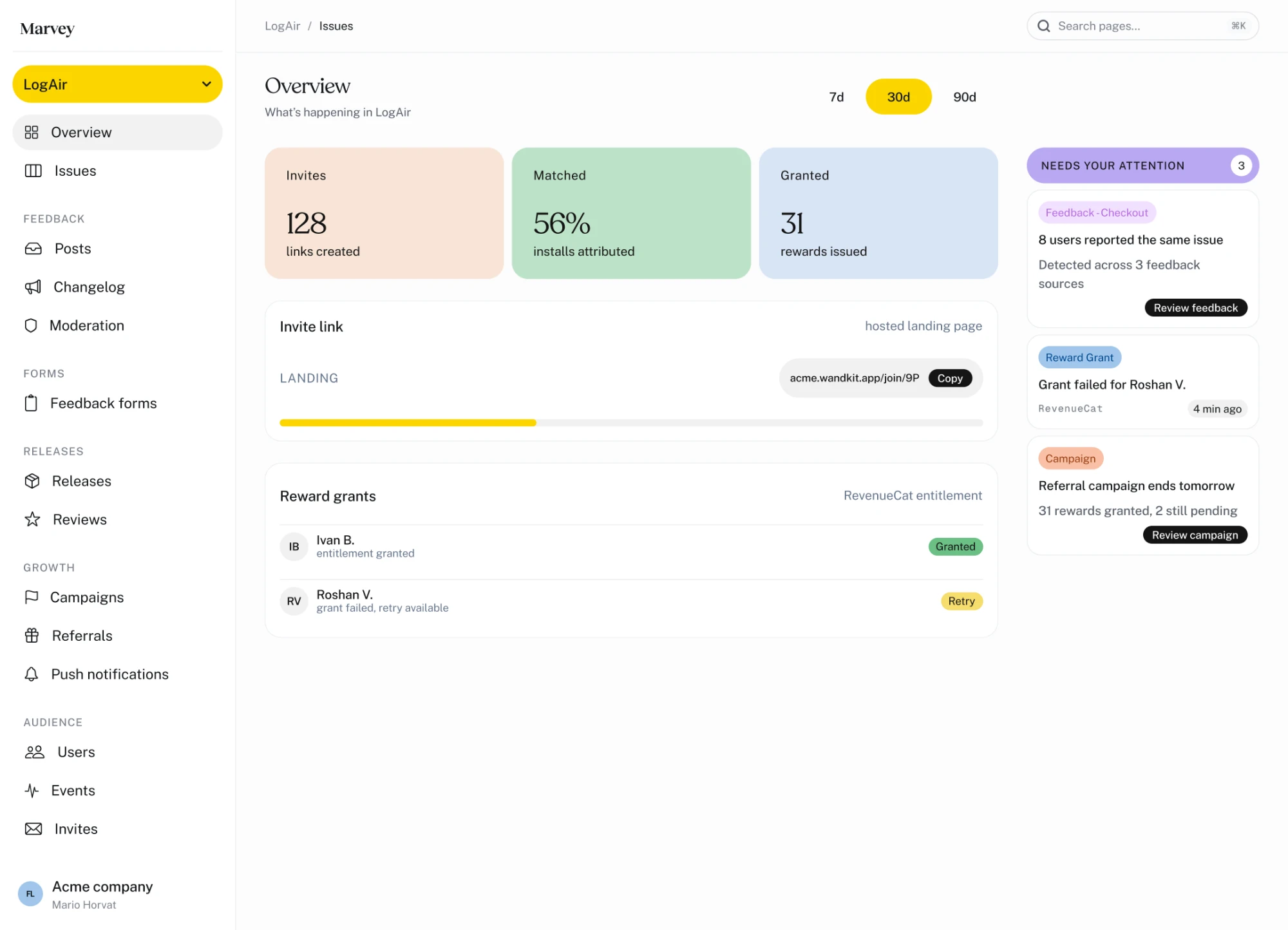
Detected across 3 feedback sources
Review feedbackYour everyday  product companion
In-app feedback for iOS apps. Collect it inside your app, organize it in one dashboard, and tell users when their ideas ship.
Book a demo
In private beta · iOS 15 and up



The Marvey dashboard
The Marvey dashboard: an overview of invites, installs attributed and rewards issued, an invite link, reward grants from RevenueCat, and a column of items that need your attention.
Two sides,
one product.
Add the Swift package and your team’s dashboard fills itself. Nothing to connect, nothing to export, nothing to keep in step.
Let users speak up
Ask questions at the right moment. Collect ideas, votes and bug reports in your app, without sending users somewhere else.
See what they’re telling you.
Review responses, organize requests and follow reported issues in your dashboard, with the context of who sent them.
The right question.
At the right moment.
A survey waits for the moment you choose, the answer arrives with the person attached, and the wording is yours to change at any time.
Ask on the event,
not on open.Show surveys after the moments that matter, with rules that decide when and who to ask.

One inbox.
Nothing gets lost.Answers, posts and bug reports land in one queue, tied to the user who sent them.

Reword it
without a release.Update survey questions and options on the server, without waiting for another App Store build.

From a user request
to a shipped update.
Follow a real example of how feedback moves from your app to your team, and back to your users.
A user asks for offline mode
Someone posts a feature request directly in your app. Other users vote for it and follow along.
Your team sees the demand.
Related requests are brought together, making it easier to see how many people want the same thing.
The work gets tracked.
Create an issue for the request and keep its status connected to the original feedback.
Users hear when it’s ready.
Once the feature ships, everyone following the request can be notified.
Your feedback.
Your workflow.
Keep it in Marvey, or move it into the tools your team already uses. Nothing has to stay here to stay useful.

Survey · checkout
248 responses
Checkout experience
NDJSONSlackReady to export
Export responses
Four surfaces live.
One in beta.
One SDK, and you turn on the parts you need. Everything writes to one user profile.
In-app surveys
Live
Ask on a real event, take the rating, then the follow-up — in one sheet, without sending anyone to a form.
Feedback board
Live
Requests, bugs and praise in one place, voted on by the people who asked for them.
Releases & store reviews
Live
Phased rollout, App Store and Google Play reviews, and the reply box — on one screen.
Screenshot bug reports
Live
Your own window, re-rendered and attached. It never touches the photo library.
Referrals & rewards
Beta
Invite links, matched installs and reward grants. Conversions come from your own backend.
Four more on the way
- Behavioral event analyticsSoon
- Server-driven localizationSoon
- Smart deep linkingSoon
- Contextual in-app helpSoon

Frequently asked.
An in-app feedback and survey platform for iOS apps, plus a dashboard where your team works the results. Surveys trigger on events you already send, and the same SDK opens a feedback board inside your app, where posts are approved by your team before they go public. It is in private beta, on iOS 15 and up, with no Android or React Native SDK yet.
Add the Swift package, call Marvey.configure(apiKey:) once at startup, then Marvey.identify() after sign-in. Sending an event is one line. The SDK has no runtime dependencies and targets iOS 15 and up.
You pick an event and a rule: the exact Nth time it happens or every Nth time, a cooldown so nobody sees it twice, and an app-version condition. When your app sends the event, Marvey answers with a survey or with nothing at all.
Every post that comes from the SDK arrives pending and waits for someone on your team to approve it. That is not a setting you can switch off, it is how the board works. While a user is typing a title we also show similar existing posts, so they vote instead of filing a duplicate.
Yes. Question text, options and button labels live on the server, so rewording a confusing question takes effect for the next user. You can also keep the definitions in your repo with marvey forms pull and push, review them in a pull request, and export responses as NDJSON.
iOS 15 and up. There is no Android or React Native SDK yet. On the dashboard side the release board covers both App Store Connect and Google Play, and you can reply to store reviews from either.